
3PL Invoice Auditing
Check the invoice from your third-party logistics provider against the rates you agreed and the work your own records show. The WarehouseCalc 3PL Invoice Audit reads the provider’s invoice export, your rate card and your order, shipment or receipt records in their own layouts, runs only the checks that this evidence supports, and shows every flagged line with the evidence behind it. Files are read in your browser and are not uploaded.
What 3PL invoice auditing means
3PL invoice auditing is checking each charge on a logistics provider’s invoice against two kinds of evidence: what was agreed (the rate card, minimums, tiers and the dates rates apply from) and what actually happened (orders shipped, pallets received, units returned). A warehouse or fulfillment billing invoice is not one figure: storage, receiving, putaway, pick and pack, labels, returns, accessorial charges and surcharges each appear as separate lines, often hundreds per month, and each one depends on a different record.
A 3PL invoice audit does not start from the assumption that the provider is wrong. Most lines are usually right; the work is finding the few that do not match the evidence, and being able to show exactly why.
Who needs it
- Brands and retailers that outsource warehousing or e-commerce fulfillment and receive a detailed monthly invoice.
- Finance teams that approve 3PL invoices and need a record of what was checked before paying.
- Operations and supply chain managers who manage the 3PL relationship and want disagreements settled on evidence, not impressions.
What files the tool accepts
| File | Needed? | What it should hold |
|---|---|---|
| The 3PL’s invoice export | Yes | The detailed invoice as Excel (.xlsx) or CSV, one row per charge. At least a line amount; charge codes or descriptions, quantities, unit rates, billing units, service dates and order or shipment references make more checks possible. |
| Your rate card | Optional | Contracted rates as Excel or CSV: service codes or descriptions, billing units and rates; effective dates, minimum charges and volume tiers when you have them. |
| An operational export | Optional | Orders, shipments, receipts or returns from your WMS or order system, with the reference the 3PL bills against and the quantities (units, cartons, pallets). |
Column names do not have to follow a template: “Svc Code”, “Shipment #”, “Billable Units” or “Ext. Amount” are recognised by their meaning, and you confirm every column before the audit runs. When two columns could mean the same thing, the tool asks instead of guessing. PDF and scanned invoices are not read in the current release: ask your provider for the invoice detail as Excel or CSV.
Invoice-only, rate-card and operational checks
| With | What is checked |
|---|---|
| The invoice only | Quantity × rate against each line amount; possible duplicate lines (same charge, reference, date, quantity and amount — repeated charges for different orders are not called duplicates); the lines adding up to the stated invoice total, with credits, tax and rounding; missing or malformed values and mixed currencies. |
| + your rate card | Each billed rate against the contract rate in force on the service date, in the same billing unit and currency, with minimum charges and the volume tier that applies; charge codes that are not in the rate card; minimums, surcharges and ad hoc charges that need contract interpretation. |
| + your operational records | Invoice references found in your own records; billed quantities compared with your quantities where the units agree; charges without references compared in total for the period when you say what they count. |
Before running, the tool lists which checks your files make possible and which are not, and why. An audit of the invoice alone is still useful, but it never claims that contract or operational checks were done.
What the audit can and cannot establish
A verified calculation mismatch means the invoice contradicts itself, for example quantity × rate does not give the line amount. A contract-rate difference, quantity mismatch, possible duplicate or unsupported reference is a potential difference: the line disagrees with the evidence you supplied and should be reviewed with the provider. Needs more evidence means the files are not enough to decide.
The audit cannot know contract terms that are not in your rate card, it never converts between units or currencies, and a reference missing from an incomplete operational export proves nothing. A line that is not flagged had no discrepancy found by the checks that could run; it is not proven correct. Differences are reasons to review, not proof of overbilling and not guaranteed savings.
The reviewable report
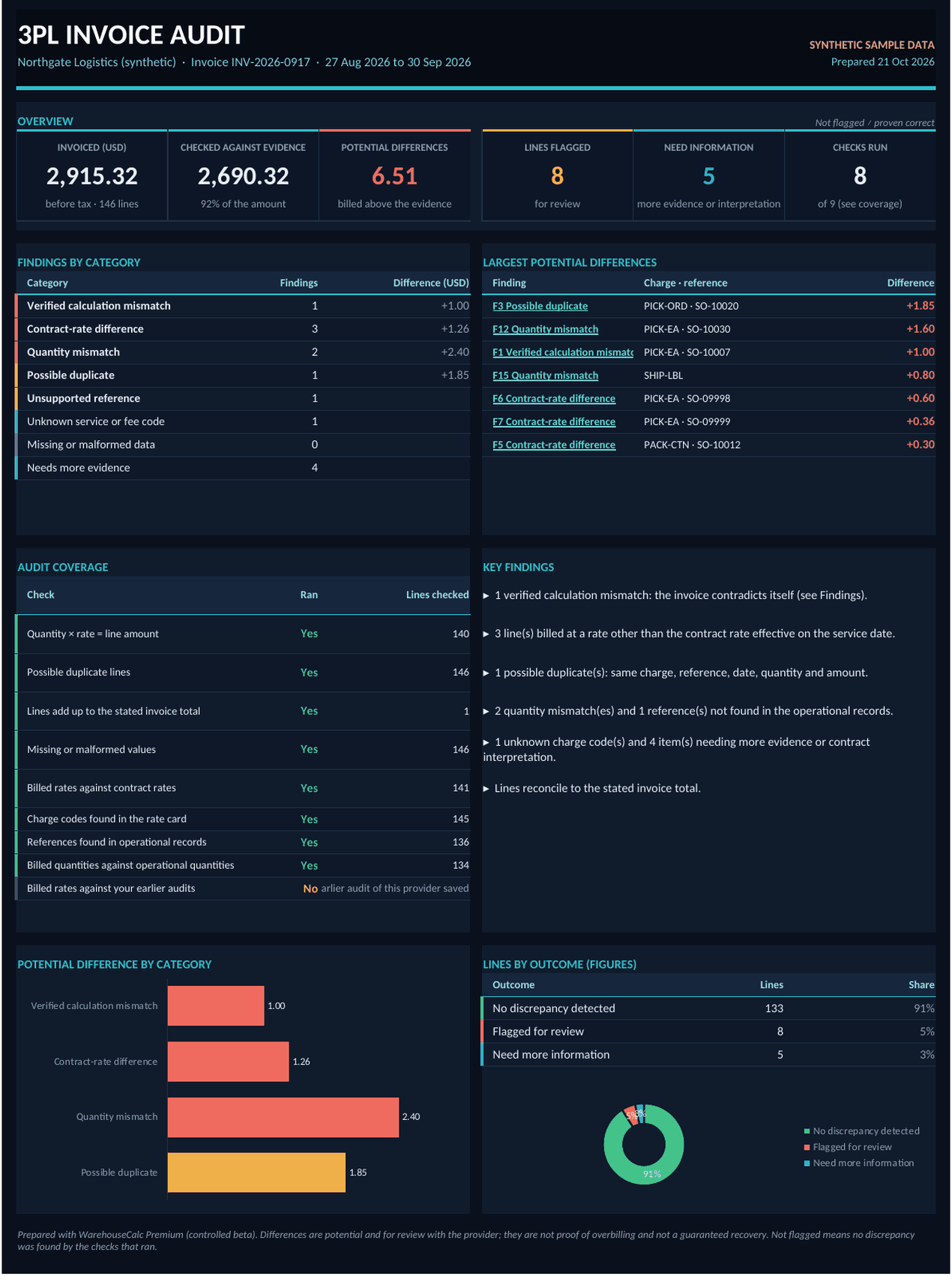
On screen you get a review queue you can filter and sort, every invoice line with its outcome, the reconciliation of the stated totals and the coverage of the checks. The Excel evidence report adds a dashboard, every finding with the source row, billed and expected amounts, the difference, the evidence used and a recommended next action, a column for your review status, the rate card and records as read, the method of each check and the data-quality notes. A draft query lists the flagged lines for you to edit and send yourself; the tool never contacts your provider.
How to get access
The 3PL Invoice Audit is part of WarehouseCalc Premium, which is in a free controlled beta. Request access with your name and email, confirm your address, and wait for approval: every account is approved by hand, and no payment details are asked for. Approved accounts open the tool from the Premium tools page and can try it first with invented sample files.
Request beta access About WarehouseCalc Premium
Prefer free tools? See the warehouse calculators. Questions: contact us.